

Claude is an AI assistant made by Anthropic. You can use it free, and paid plans start at $17 a month on annual billing ($20 if you pay monthly). This Claude AI review explains what each plan costs, what Claude does well, where it falls short, and who should pay for it. The biggest complaint by far is usage limits, so we cover those in detail.
One note on how this guide was made: it is based on Anthropic’s own pages and on published reviews and user reports. We did not run our own benchmark tests, so anything about quality is what reviewers say, not a measured result.
Claude at a glance
| Item | Details |
|---|---|
| Made by | Anthropic |
| Works on | Web, Windows and macOS desktop apps, iPhone/iPad, Android |
| Free plan | Yes, with usage limits |
| Paid plans (US prices) | Pro $20/month ($17 billed annually), Max $100/month, Ultra $200/month |
| Team and business | Team from $20 per seat/month billed annually; Enterprise by contract |
| Best for | Writing, editing, long documents, coding help, research |
| Biggest weakness | Usage limits, no image creation |
What is Claude?
You type a request and Claude replies. It can answer questions, rewrite text, summarise files you upload, search the web, help you write code and build small tools. Reviewers often say its replies feel natural and that it keeps track of context well in long chats. Those are opinions, but they come up again and again.
Behind the chat is an AI model, the engine that writes the answers. Anthropic’s current models, according to its developer documentation, are:
- Claude Fable 5.1: for the hardest reasoning and long, multi-step work. The documentation calls it the most capable and slowest option.
- Claude Opus 5.5: for long-running coding and knowledge work. Anthropic suggests it as the starting point for most heavy tasks.
- Claude Sonnet 5.5: the balance of speed and intelligence.
- Claude Haiku 5.5: the fastest and cheapest model, built for quick, high-volume jobs.
The same page lists a 1 million token context window for all four models. That figure is for Anthropic’s developer platform. The limits you get in the chat app can differ, so do not assume the same size on a Free or Pro plan.
Claude features that matter
Chat, web search and files
Every plan, including Free, lists web search, file creation and code execution. Upload a PDF or document and ask for a summary, a rewrite or a list of key dates.
Projects, memory and Artifacts
Projects keep chats and files for one topic together. Free allows up to 5 projects and Pro lists unlimited projects. Memory lets Claude carry details between chats. Artifacts are the panel where Claude builds documents, web pages and small tools next to the chat.
Research and Claude Code (paid plans)
Research is a longer task where Claude searches many sources and writes a report. Claude Code is Anthropic’s coding tool for developers. Both appear in the Pro plan, not in Free. On Pro, Claude Code shares the same usage limits as normal chat, which matters if you code a lot.
Where you can use Claude
Anthropic lists the website, desktop apps for macOS and Windows, and iOS and Android apps. There is also Claude in Chrome (a browser extension), add-ins for Microsoft 365 and Google Workspace, and Claude Tag for Slack, which is in beta for Team and Enterprise. If you want AI inside your browser on Windows, see our AI browser roundup.
Claude AI pricing: every plan compared
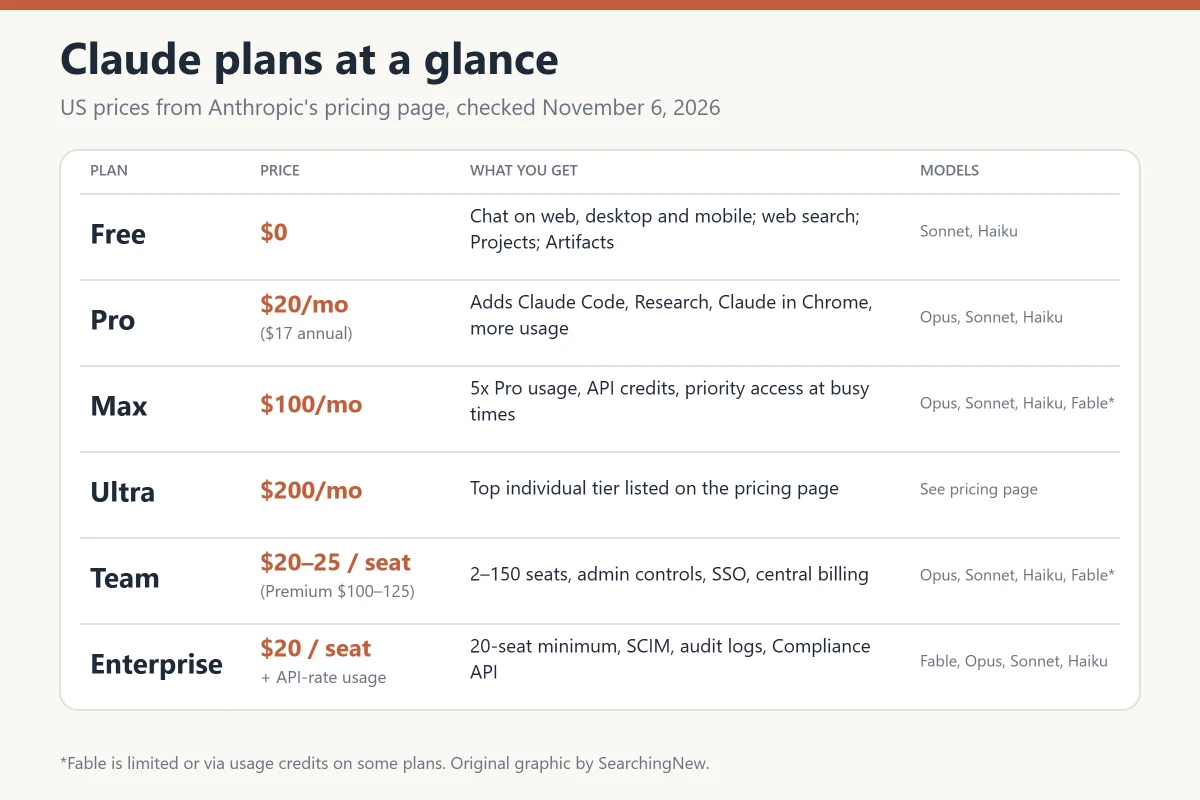
| Plan | Price (US) | Main extras |
|---|---|---|
| Free | $0 | Chat on web, desktop and mobile, web search, Artifacts, memory, up to 5 projects, limited usage |
| Pro | $20/month, or $17/month billed annually ($200 up front) | Claude Code, Research, unlimited projects, Claude in Chrome, Microsoft 365 add-in, Opus model |
| Max | $100/month | 5x Pro usage, API credits, priority access at busy times |
| Ultra | $200/month | Listed on the pricing page as a higher individual tier |
| Team | Standard seat $20 (annual) or $25 (monthly); Premium seat $100 (annual) or $125 (monthly) | 2 to 150 seats, admin controls, SSO, central billing |
| Enterprise | $20 per seat/month billed annually, 20-seat minimum, plus usage at API rates | Audit logs, SCIM, Compliance API, custom data retention |
These figures come from Anthropic’s pricing page. They are US prices, and Anthropic says prices and plans can change. Local prices and taxes may differ, so check the amount shown when you subscribe. Free chats use Sonnet and Haiku, Pro adds Opus, and the Fable model is available through usage credits on Pro and within weekly limits on Max.
Is Claude AI free?
Yes. Claude has a Free plan with no time limit. You need an account, and you get less usage than paid users. Usage is counted in a five-hour window and a weekly window, and when you hit it you wait for the reset. Older articles describe a “daily message limit”, but Anthropic’s current pricing page describes the five-hour and weekly windows.
Which Claude plan should you choose?
- Free: start here. Enough for a few questions a day, light writing and trying the tool.
- Pro ($20, or $17 annual): the sensible paid plan if you use Claude most days or need Claude Code and Research.
- Max ($100): only if you keep hitting Pro limits and the time lost costs you more than the price difference.
- Team or Enterprise: for businesses that need shared billing, admin controls and security features.
A simple approach: use Free first and upgrade only after you actually hit a limit. Pro can be paid monthly, so you can try it for one month before committing to the annual price.
Claude usage limits explained
This is the part most reviews skip over, and it is the main reason people get frustrated. Per Anthropic’s help article on Pro usage, Pro resets every five hours, and during peak hours it offers at least five times the per-session usage of Free. Anthropic may also apply weekly caps.
How fast you use up your allowance depends on three things: the length of your message including attached files, how long the current chat has become, and which model or feature you use. Anthropic’s own example is about 45 short messages per five hours on a lighter model, and it says the number can be higher or lower depending on demand.
Ways to make your usage last longer, from Anthropic’s help article:
- Combine several questions into one message instead of sending them one by one.
- Do not upload the same file again in the same chat.
- Use Projects for repeat work, because saved project content counts less toward your limit.
- Start a fresh chat when a long conversation has drifted, since long chats use more of your allowance.
Pros and cons of Claude
What Claude does well
- Natural, conversational replies that keep context across long chats, according to several reviewers.
- Good for writing and editing. Reviewers say it can match a tone you ask for, such as friendly or sceptical.
- Helpful for reading long documents and explaining code.
- A real free plan, plus a clear path to Pro, Max and business plans.
- Works on web, desktop and phone, with Chrome and Microsoft 365 add-ins on paid plans.
Where it falls short
- Usage limits. Reviewers describe lockouts of several hours on Pro, and the five-hour and weekly caps can stop work in the middle of a task.
- No image creation. Reviews note that Claude can build diagrams and charts, but it does not create pictures the way some rivals do.
- It can be wrong. Like every AI chatbot, it can state false things with confidence, so check facts, quotes and citations.
- Setup for business tools. Connecting Claude to helpdesks or other systems needs connectors that someone has to set up.
- Plan complexity. Pro, Max, Ultra, Team Standard and Team Premium make the ladder harder to read than it used to be.
What are the common complaints about Claude?
It helps to read the complaints with some care. Review sites such as Trustpilot attract people who had a problem, so the ratings there look harsher than the experience of the average user. Even so, the same themes repeat, and they are worth knowing before you pay.
- Limits on paid plans. Many Trustpilot reviewers from spring 2026 say Pro limits ran out after only a few prompts. A long Reddit thread on usage limits collected similar reports from March and April 2026, and the moderators’ summary says Anthropic confirmed three bugs.
- Quality changes. In April 2026, Fortune reported a backlash from heavy users who felt Claude had got worse. It linked this to Anthropic lowering the default “effort” setting to save tokens, plus outages and stricter peak-hour limits. Most of those complaints were about Claude Code.
- Billing and support. Some Trustpilot reviewers report unexpected charges, refund requests turned down and trouble reaching a human. These are individual claims we could not verify.
To be fair, not every review is negative. Several reviewers, including some who complained about limits, still describe the quality of the answers as strong. If you start on Free and upgrade only when you need to, you take on much less of this risk.
Is Claude safe to use?
For everyday tasks, yes, if you use it carefully. On the consumer plans (Free, Pro and Max), Anthropic’s privacy page says your chats can be used to improve Claude in three cases: you turn on the Model Improvement setting, a conversation is flagged for safety review, or you explicitly opt in to a programme such as the Trusted Tester Program. Incognito chats are not used for model improvement. Thumbs up or down feedback is stored for up to five years and may be used for training after it is de-linked from your user ID.
- Open Settings, go to privacy controls and check the Model Improvement option before you share anything personal.
- Do not paste passwords, bank details, ID numbers or private company files.
- Check names, dates, numbers and medical or legal details against an official source.
How to get started with Claude safely
- Go to claude.ai in your browser, or install the official app from the App Store, Google Play, or Anthropic’s own download page. Avoid sites and apps that only look similar.
- Create an account and turn on any extra login protection your account settings offer.
- Check the privacy controls in Settings before you share anything personal.
- Write a clear first prompt. Say who you are, what you want and what format you need.
- Check important facts before you use the answer.
- Upgrade only after you hit a limit on the Free plan.
Three example prompts to try:
- “Summarise this PDF in five bullet points and list every date mentioned.”
- “Rewrite this email to sound polite but direct. Keep it under 100 words.”
- “Explain what this error message means and give me three fixes, easiest first.”
Common Claude problems and fixes
These are general tips based on Anthropic’s help pages and common user reports. We did not reproduce each error ourselves.
- “Usage limit reached”: wait for the reset time shown in the message. On Pro you can see the weekly reset time in Settings, under Usage. If it happens every day, shorten your chats, combine questions, or consider a higher plan.
- Limits drain too fast: long chats and large uploads cost more. Start a new chat for a new topic and avoid re-uploading files.
- Chat not loading or stuck: check Anthropic’s status page, refresh, try a private window or another browser, and turn off extensions.
- Wrong or made-up answer: ask it to list sources and say when it is unsure, then verify them. A fresh chat with a clearer prompt often helps.
- Unexpected charge: check your invoices and which account or app store you subscribed through, then contact support through the Help Center. If you subscribed through Apple or Google, manage the subscription there.
Claude vs ChatGPT
Most people comparing Claude with an alternative are really comparing it with ChatGPT. This table uses each company’s own plan information. The ChatGPT details come from our ChatGPT review (US prices, checked November 5, 2026).
| Claude | ChatGPT | |
|---|---|---|
| Free plan | Yes, with usage limits | Yes, with limits |
| Standard paid plan | Pro, $20/month ($17 annual) | Plus, $20/month |
| Cheaper paid step | None below Pro | Go, $8/month |
| Heavy-use plans | Max $100, Ultra $200 | Pro $100, $200 or $500 |
| Image creation | No, per reviewers | Yes, limited on Free |
| Coding tool | Claude Code, on paid plans | Codex, included in every plan |
| Best for | Writing, long documents, coding | One app with many features |
Reviewers often say Claude writes more naturally, while ChatGPT is the broader all-in-one tool. Those are opinions, and neither is the winner for every job. Both have free plans, so the best test is to try the same task in each. Google’s Gemini is a third option, and we cover its newest model in our Gemini 4 Argon guide.
Claude AI review FAQ
Is Claude AI free to use?
Yes. Claude has a Free plan with no time limit. It includes chat, web search and Artifacts, but usage is limited per five-hour and weekly window.
How much does Claude Pro cost?
Claude Pro costs $20 per month, or $17 per month when billed annually ($200 up front), in the US. Local prices and taxes can differ.
Is Claude Pro worth it?
It is worth it if you use Claude most days and want Claude Code, Research and higher limits. If you only ask a few questions a week, Free is usually enough.
Why do I hit the Claude usage limit so fast?
Usage depends on message length, attached files, how long the chat is and which model you use. Long chats and repeated file uploads use the most. Combine questions and start new chats to make your allowance last.
Is Claude better than ChatGPT?
Neither is better at everything. Reviewers often prefer Claude for writing and long documents, while ChatGPT offers image creation and a broader set of features. Try both free plans on your own tasks.
Does Claude use my chats to train its models?
On Free, Pro and Max, chats can be used to improve Claude if you turn on Model Improvement, if a chat is flagged for safety review, or if you opt in to a programme. Incognito chats are not used. You can change the setting in your privacy controls.
Can Claude create images?
Reviewers say it cannot generate pictures, though it can build diagrams and charts. If you need image creation, check the tools that include it.
Can I use Claude on my phone?
Yes. Anthropic lists iOS and Android apps, plus the website and desktop apps for Windows and macOS.
Want to know what Anthropic’s newest top model can do? Read our explainer on Claude Mythos 5.2 and how it differs from Fable 5.2.
Final verdict: is Claude worth it in 2026?
Claude is a strong choice if most of your AI use is writing, editing, reading long documents or getting coding help. Start with the Free plan. Move to Pro when you use it daily and keep hitting the free limits, and only consider Max if Pro limits are costing you real time.
The main risk is not the quality of the answers. It is how far your allowance goes, how plans are explained, and how easy it is to get help if billing goes wrong. If you need image creation or one app that does everything, look at ChatGPT as well. Plans, prices and model names change often, so confirm the current details on Anthropic’s pricing page before you pay.
Sources
- Anthropic: Claude plans and pricing
- Anthropic: About Claude’s Pro plan usage
- Anthropic: Is my data used for model training?
- Anthropic: Models overview
- Fortune: Anthropic faces backlash over perceived Claude performance decline (April 14, 2026)
- eesel AI and RivalFlow Claude reviews, Trustpilot and r/ClaudeAI user reports (vendor and user-written sources, read with caution)
Pingback: ChatGPT Review (2026): Pricing, Plans and Is It Worth It?
Pingback: Best AI Browser for Windows 11 in 2026: 7 Options Compared
Pingback: Best AI Assistant in 2026: 5 Top Picks Compared (Free & Paid)
Pingback: Claude Mythos 5.2: Access, Price and Fable 5.2 Differences