

ChatGPT is OpenAI’s AI chatbot, and in 2026 it is still one of the easiest all-round AI assistants to start with. The free plan covers everyday questions. Paid plans start at $8 a month (Go), and Plus at $20 a month is the plan most regular users will look at. This ChatGPT review explains what each plan gives you, what it costs, where ChatGPT is weak, and when another tool may suit you better.
ChatGPT at a glance
| Item | Details |
|---|---|
| Made by | OpenAI |
| First released | November 2022 |
| Works on | Web, iPhone and iPad, Android, plus desktop apps (see chatgpt.com/download for your system) |
| Free plan | Yes |
| Paid plans (US prices) | Go $8/month, Plus $20/month, Pro from $100/month |
| Team plan | Business from $20 per user/month billed annually |
| Best for | Writing help, research, studying, everyday questions, light coding |
What is ChatGPT?
You type (or speak) a request and ChatGPT replies. It can answer questions, rewrite text, summarise files you upload, search the web, create images and run longer research tasks.
Behind the chat is an AI model, the engine that writes the answers. OpenAI’s current family is called GPT-6, with models named Luna, Sol and Astra. According to OpenAI’s plan table, Free and Go chats use GPT-6 Luna, while Plus and Pro add more advanced reasoning models. Model names change often. For a recent example of how fast things move, see our post on OpenAI cancelling the GPT-6.1 Astra release.
ChatGPT features that matter
Chat, web search and file uploads
Text chats are unlimited on every plan, subject to OpenAI’s fair-use rules. Web search is included on all plans. Uploads are limited on Free and larger on Go, Plus and Pro.
Image creation and voice
Free users get limited image creation and voice chats. Go adds more of both, plus voice with video. Plus offers more complex and accurate images, and Pro lists unlimited, faster image creation.
Deep research
Deep research is a longer task where ChatGPT searches many sources and writes a report. It is limited on Free and Go, expanded on Plus and set to maximum on Pro. Always check the sources it lists before you rely on the report.
Projects, memory and custom GPTs
Projects let you keep chats and files for one topic together. Memory lets ChatGPT remember details between chats; it is limited on Free and expanded on Plus and Pro. Custom GPTs and scheduled tasks are listed under Plus.
ChatGPT Work and Codex
These are OpenAI’s tools for longer, multi-step jobs and for coding. Both are included in every plan, and they share one usage allowance. Access is limited on Free and Go, expanded on Plus and larger on Pro.
Dots (Pro only)
Dots are always-on agents that keep working after you close the chat. OpenAI lists them as a Pro feature. We explain how they work in our guide to OpenAI Dots.
Office add-ins
OpenAI lists extensions for Excel, Word, PowerPoint and Google Sheets. They are limited on Free and Go and fully available on Plus.
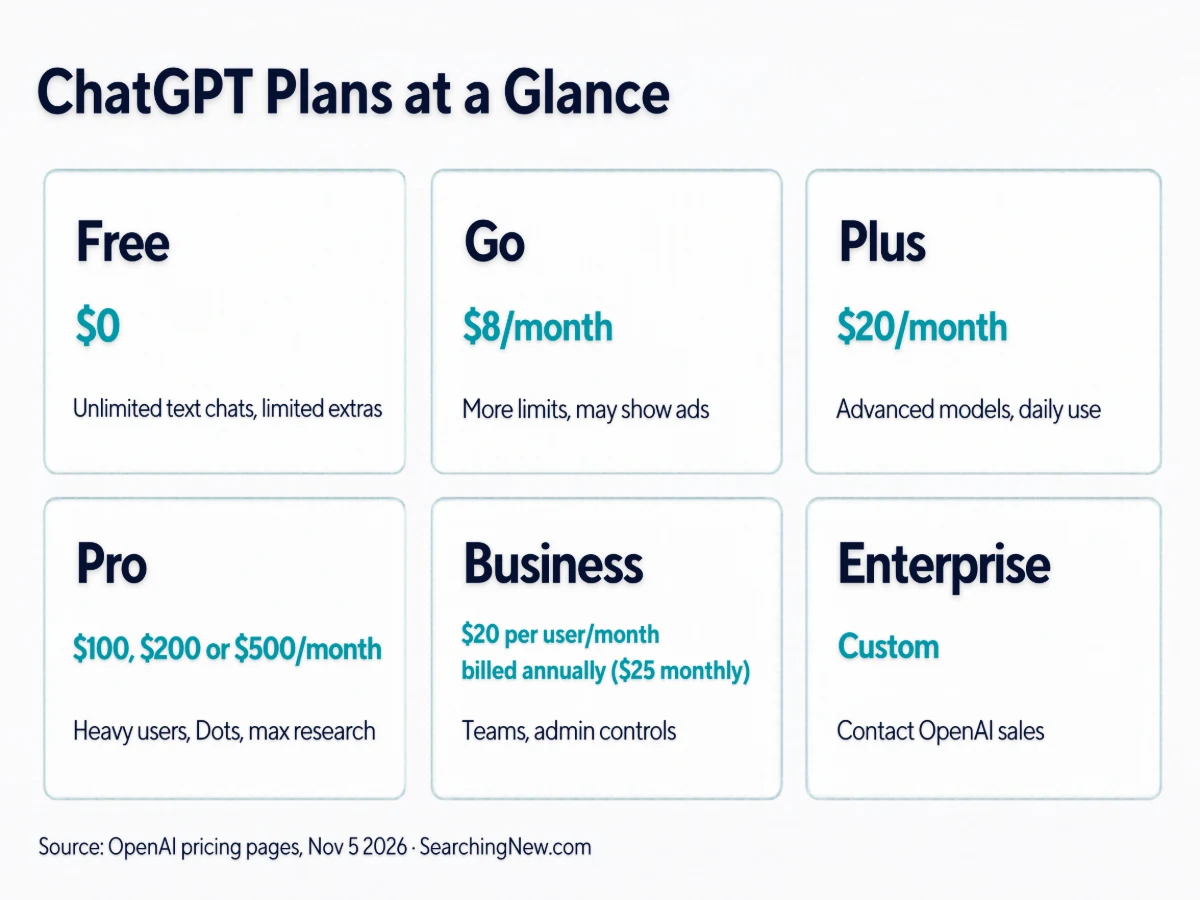
ChatGPT pricing: every plan compared
| Plan | Price (US) | Best for | Main extras |
|---|---|---|---|
| Free | $0 | Trying ChatGPT, light use | Unlimited text chats, limited uploads, images, voice and deep research |
| Go | $8/month | People who keep hitting Free limits | More messages, uploads, images and voice; longer memory; may show ads |
| Plus | $20/month | Daily personal use | Advanced reasoning models, expanded limits, custom GPTs, expanded Codex and Work |
| Pro | $100, $200 or $500/month | Heavy users | Three usage tiers, Pro reasoning, Dots, unlimited faster images, maximum deep research, monthly API credits |
| Business | $20 per user/month billed annually ($25 billed monthly), 2+ users | Small teams | Shared workspace, admin controls, no training on your business data by default |
| Enterprise | Custom | Large organisations | Contact OpenAI sales |
Prices come from OpenAI’s pricing page and its plan documentation. They are US prices. Local prices and taxes can differ, so check the price shown when you subscribe. OpenAI’s pricing page does not list an exact usage multiple for the Pro tiers compared with Plus, so treat any “5x” or “20x” claims you see elsewhere as unconfirmed.
How much text can ChatGPT handle?
OpenAI also publishes context window sizes. This is how much text ChatGPT can keep in mind in one chat. Bigger is better for long documents.
| Plan | Standard chat window | Reasoning window | Approx. input limit (standard chat) |
|---|---|---|---|
| Free | 27K | Varies | About 12 pages of text |
| Go | 54K | 256K | About 40 pages |
| Plus | 54K | 256K | About 40 pages |
| Pro | 128K | 400K | About 250 pages |
Which ChatGPT plan should you choose?
- Free: start here. It is enough if you ask a few questions a day.
- Go ($8): consider it when you keep running into Free limits and don’t need the advanced models. OpenAI says this plan may include ads.
- Plus ($20): the sensible paid plan for daily work, study or content creation. It adds the advanced reasoning models and larger limits.
- Pro ($100 to $500): only if you regularly hit Plus limits or need Dots and maximum research. Most people don’t.
- Business: for teams that want shared admin controls and data protection.
A simple approach: use Free first and upgrade only when you actually hit a limit. Go, Plus and Business are billed monthly, so you can try a plan for one month and see if it earns its price.
Pros and cons of ChatGPT
What ChatGPT does well
- Wide range of features in one app: chat, search, images, voice, research and coding help.
- Easy to start. Reviewers on G2 rate its ease of use highly, and the free plan lets you try it without paying.
- A clear upgrade path from Free to Pro, with published context window sizes.
- Works on web, phone and desktop.
Where it falls short
- It can be wrong. ChatGPT sometimes states false things with confidence. In G2’s review, about 5% of user reviews mention accuracy problems.
- Usage limits. The same G2 analysis says roughly 8% of reviewers complain about limits, mostly on cheaper plans.
- Ads on lower tiers. OpenAI says Go may include ads, and review sites report ads on Free as well. Ads availability may depend on your country.
- Confusing plans. There are six plan types and three Pro tiers, plus changing model names.
- Memory is not perfect. Some users say it does not always remember preferences as expected.
Is ChatGPT safe to use?
ChatGPT is fine for everyday tasks if you use it carefully. OpenAI’s plan table says content may be used to train its models on individual plans, with an opt-out available. Business plans do not train on your data by default.
- Do not paste passwords, bank details, ID numbers or private company files.
- Open Settings and look for the data controls. Menu names can change, so search the settings for “data” or “training”.
- Check names, dates, numbers and legal or medical details against an official source.
How to get started with ChatGPT safely
- Go to chatgpt.com or install the official app from the App Store or Google Play. Avoid apps and sites that only look similar.
- Create an account and turn on any extra login protection your account settings offer.
- Check the data controls in Settings before you share anything personal.
- Write a clear first prompt. Say who you are, what you want and what format you need.
- Check important facts before you use the answer.
- Upgrade only after you hit a limit on the free plan.
Three example prompts to try:
- “Summarise this PDF in five bullet points and list any dates mentioned.”
- “Rewrite this email to sound polite but direct. Keep it under 100 words.”
- “Make me a four-week study plan for a beginner learning Excel, one hour a day.”
Common ChatGPT problems and fixes
These are general tips. I did not reproduce each error for this review.
- “You’ve reached your limit”: limits apply to every plan. Wait for the reset time shown in the message, or move to a higher plan if it happens daily.
- Chat stuck or page not loading: check OpenAI’s status page, refresh, try a private window or another browser, and turn off extensions.
- Wrong or made-up answer: ask it to list sources and say when it is unsure, then verify. Start a new chat with a clearer prompt.
- It forgets earlier details: long chats hit the context window. Ask for a short summary and start a new chat with it, or use Projects.
- Can’t log in: reset your password only from the official site. Ignore emails or ads offering “login help”.
ChatGPT vs Claude vs Gemini
ChatGPT is not the only option. This table uses each company’s own pricing page (US prices, checked November 5, 2026).
| ChatGPT | Claude | Gemini | |
|---|---|---|---|
| Free plan | Yes, with limits | Yes, with usage limits | Yes, with limits |
| Entry paid plan | Go, $8/month | No cheaper tier than Pro | Google AI Plus, $4.99/month |
| Standard paid plan | Plus, $20/month | Pro, $20/month ($17 per month on annual billing) | Google AI Pro, $19.99/month |
| Heavy-use plans | Pro, $100 / $200 / $500 | Max $100, Ultra $200 | AI Ultra from $99.99 |
| Notable extras | Image creation, voice with video, Dots on Pro | Projects, research and Claude Code on paid plans | Gemini in Gmail and Docs, extra Google storage |
Reviewers often say Claude (see our Claude AI review) writes more naturally and Gemini suits people who live in Google apps. Those are opinions, not results from my own tests. If you use Gemini Gems, see our guide to converting Gems to Skills. If you want AI built into your browser on Windows, compare the options in our AI browser roundup.
Choose ChatGPT if you want one app with many features. Choose Claude if writing quality and long documents matter most to you. Choose Gemini if Gmail, Docs and Google storage are already part of your day. All three have free plans, so you can compare them yourself.
ChatGPT review FAQ
Is ChatGPT free to use?
Yes. The Free plan gives you unlimited text chats, with fair-use rules, and limited uploads, images, voice and research.
How much does ChatGPT Plus cost?
ChatGPT Plus costs $20 per month in the US. Go costs $8 per month, and Pro starts at $100 per month. Local prices and taxes can differ.
Is ChatGPT Plus worth it?
It is worth it if you use ChatGPT most days and want the advanced reasoning models and higher limits. If you only ask a few questions a week, Free is usually enough.
Does ChatGPT show ads?
OpenAI says the Go plan may include ads. Review sites also report ads on Free in some regions. Check the plan details for your country.
Does ChatGPT use my chats to train its models?
On individual plans, OpenAI’s plan table says content may be used to train its models and an opt-out is available. Business plans do not train on your data by default.
Is ChatGPT always correct?
No. It can give wrong answers with confidence, so check important facts, numbers and advice.
What is the difference between ChatGPT Plus and Pro?
Pro adds three usage tiers, Pro reasoning, Dots, unlimited and faster images, maximum deep research and monthly API credits. OpenAI does not publish an exact usage multiple against Plus.
Can I use ChatGPT on my phone?
Yes. ChatGPT works on the web, iOS and Android, and there are desktop apps too.
Final verdict: is ChatGPT worth it in 2026?
ChatGPT is still a strong choice if you want one AI assistant for writing, study, research and everyday tasks. Start with Free. Move to Plus when you use it daily and keep hitting limits. Treat Go as a middle step with ads, and treat Pro as a tool for heavy users only.
The main risk is trust. Check anything important before you use it, and keep private data out of your chats. Plans, prices and model names change often, so confirm the current details on OpenAI’s pricing page before you pay.
Sources
- OpenAI: ChatGPT plans and pricing
- OpenAI: ChatGPT Work and Codex pricing (plan prices)
- Anthropic: Claude plans and pricing
- Google: Gemini plans and subscriptions
- G2: ChatGPT review and user feedback analysis
ChatGPT also has a personal finance feature for US users. See our guide to ChatGPT Finances on desktop for what it does and how safe it is.
Pingback: Best AI Assistant in 2026: 5 Top Picks Compared (Free & Paid)
Pingback: ChatGPT Finances on Desktop: What It Does, Who Gets It and Is It Safe
Pingback: ChatGPT vs Gemini vs Claude: Which Is Best in 2026?