

ArtCraft Adobe alternatives are a set of free, open-source desktop apps that copy the look and workflow of Photoshop, Premiere Pro, Lightroom, Illustrator and other paid tools. They are real, they are free to download, and they run on Windows, macOS and Linux. They are also early alpha software, so they suit learning and personal projects better than paid client work.
Below you will find what each app does, which Adobe program it aims at, what the developers say works, what independent reviewers found missing, how to download it safely, and who should wait. One honest note: we have not installed or tested ArtCraft ourselves. Everything here comes from the official website, the GitHub pages and published reviews, and we say whose findings are whose. Last checked: 28 October 2026.
| Quick facts | ArtCraft Crafting Apps |
|---|---|
| Price | Free |
| License | MIT or Apache-2.0 (open source) |
| Platforms | Windows, macOS and Linux; most apps also run in a browser |
| Stage | Early alpha or in development, depending on the app |
| Made by | Brandon Thomas and the ArtCraft team |
| Official sites | getartcraft.com and github.com/storytold |
What is ArtCraft, and why are people talking about it?
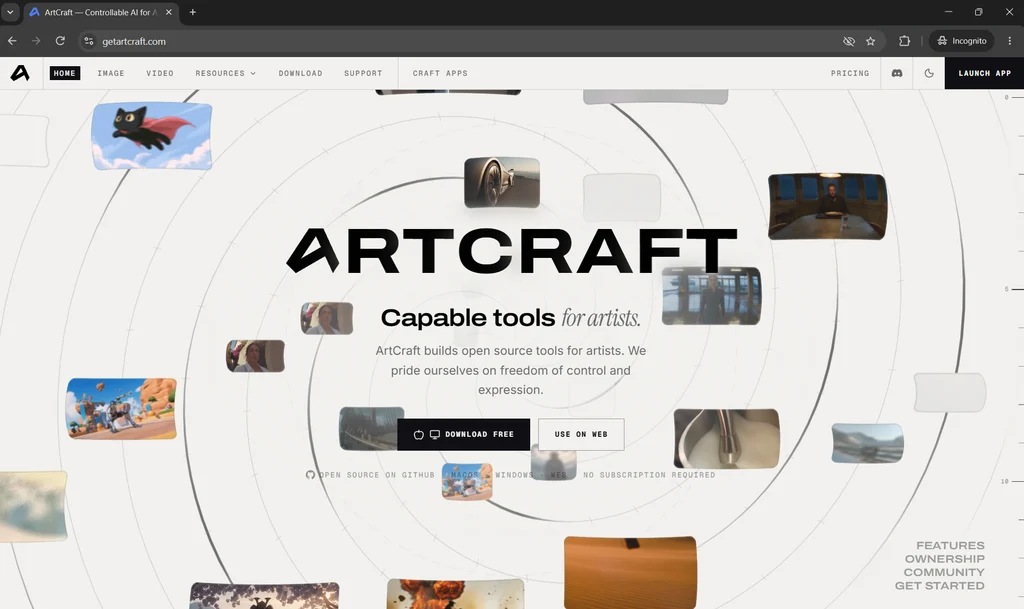
ArtCraft is a project led by US developer Brandon Thomas. In early October 2026 his team released a family of native desktop apps, written in the Rust programming language, that imitate well-known paid software. Menus, panels and shortcuts sit where Adobe users expect them, and that familiar layout is the main reason the project went viral.
Thomas has said he used Anthropic’s Claude Opus 5.5 to write much of the code. He calls the apps clean-room rebuilds, meaning they were made from public file specifications and observed behavior rather than Adobe’s code. Creative Bloq reports that he was frustrated by Adobe’s subscription costs and cancellation fees.
Two different things share the ArtCraft name
- The Crafting Apps are standalone editors for photos, video, vectors, PDFs and more. They are free, run on your own computer and need no account. This guide is mostly about these.
- The ArtCraft AI studio is the team’s original app for generating AI images and video. It is open source too, but AI generation runs on paid credits unless you bring your own compute or third-party subscriptions.
ArtCraft Adobe alternatives: the full app list
The official Crafting Apps page lists 13 apps. Seven aim at Adobe products, and the rest go after Microsoft Office, Figma, AutoCAD and audio software. The status labels below are the ones shown on that page on 28 October 2026.
| App | Aims to replace | Official status | What it is for |
|---|---|---|---|
| PhotoCraft | Adobe Photoshop | Early alpha | Layered image editing |
| VectorCraft | Adobe Illustrator | In development | Vector illustration |
| FilmCraft | Adobe Premiere Pro | In development | Video editing |
| LightCraft | Adobe Lightroom | In development | Photo library and RAW editing |
| PdfCraft | Adobe Acrobat | Early alpha | Reading, organizing and protecting PDFs |
| EffectCraft | Adobe After Effects | In development | Motion graphics and effects |
| DesignCraft | Adobe InDesign | In development | Page layout and publishing |
| FigCraft | Figma | Early alpha | Interface design and prototyping |
| WordCraft | Microsoft Word | In development | Word processing |
| GridCraft | Microsoft Excel | In development | Spreadsheets |
| DeckCraft | Microsoft PowerPoint | In development | Presentations |
| CADCraft | AutoCAD | In development | 2D drafting |
| SoundCraft | Pro Tools-style audio software | In development | Audio recording, editing and mixing |
Early news stories called the PDF app PrintCraft; its official name is PdfCraft. LightCraft is aimed at the cloud-based Lightroom rather than Lightroom Classic, according to Tatler Asia. Some unofficial download sites list different app counts, so treat the official page as the source of truth.
What works today and what is still missing
Two kinds of claims matter here: what the developers say their apps can do, and what independent reviewers actually found. We keep them separate.
PhotoCraft (the Photoshop alternative)
What the developers say: the PhotoCraft README lists layers, masks, adjustment layers, layer styles, type, brushes and 68 tools. It opens and saves PSD and PSB files in RGB, CMYK and Lab, and re-saving keeps the render of 307 of the 309 files in a public PSD test set. The README adds that a re-saved file is not identical to the original, and it states plainly that PhotoCraft is not yet a Photoshop replacement for daily professional work. The biggest gaps it names are AI and generative features, missing tools, depth in typography and plug-in compatibility.
What a reviewer found: Creative Bloq had no compatibility problems opening and saving PSD files and felt at home with the layout. It found automatic selection, content-aware fill and the spot heal tool less precise than Photoshop, filter previews that did not show up, and no generative AI features. Tatler Asia also reports that one pixel artist told Decrypt the app was unusable for their needs.
LightCraft and FilmCraft
Creative Bloq tested both on a Windows PC with an Intel Core i7 and an RTX 5070, using Canon EOS R5 files. The review dates from 13 October 2026, so some points may already be fixed.
- LightCraft: most Lightroom-style controls were where the reviewer expected them. CR3 raw files would not import straight from the camera, there were no camera-matched or lens profiles, sharpening looked harsh, and subject selection produced a radial mask instead. Object selection and AI denoising need an extra model installed by hand.
- FilmCraft: basic trimming, cuts and transitions worked. There was no 10-bit 4:2:2 playback and no optimized media, so 4K editing was slow until the clips were converted with a separate tool. It cannot open or save Premiere project files (.prproj).
The apps move fast. PhotoCraft v0.8.2 was published on 12 October, and a download directory showed version 0.10.0 a week later, so check the latest release notes before judging.
The other apps
For VectorCraft, EffectCraft, DesignCraft, PdfCraft and the Office-style apps, we found feature lists from the developers and from secondary coverage, but no independent hands-on tests in the sources we checked. For example, the app pages describe VectorCraft reading and writing SVG and PDF, and DesignCraft exporting print-ready PDF with CMYK color, bleed and crop marks. Treat these as claims, not proof.
ArtCraft pricing: is it really free?
Yes, for the Crafting Apps. They are open source, there is no subscription, and Creative Bloq confirms you do not need an account. The only paid part is the separate AI studio, where credits pay for AI image and video generation. According to the official pricing page, you can use that studio without paying by bringing your own compute and third-party subscriptions.
| AI studio plan | Price per month | Credits per month |
|---|---|---|
| Basic | $8 (list price $10) | 1,000 |
| Pro | $28 (list price $35) | 3,750 |
| Max | $48 (list price $60) | 6,600 |
| Enterprise | Custom | Custom |
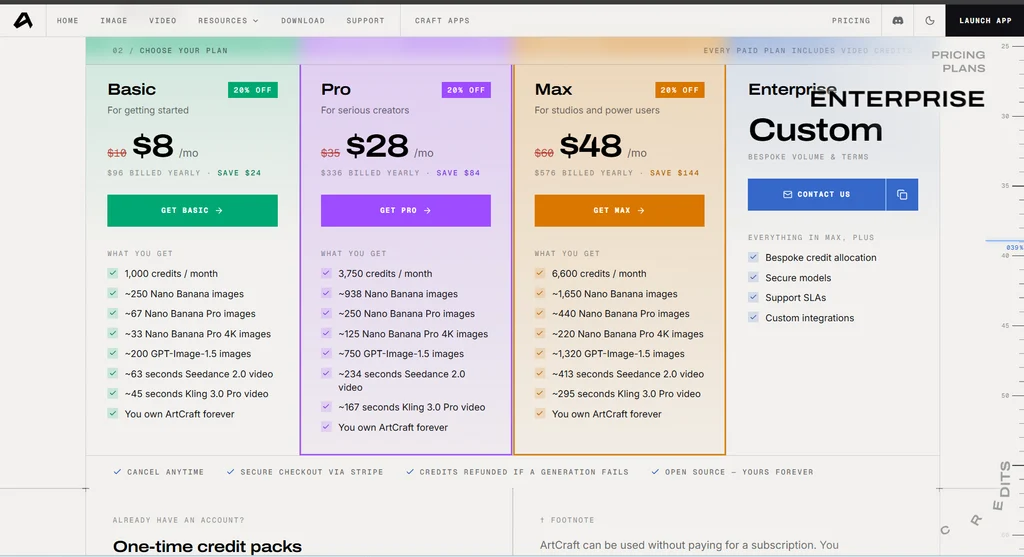
Those prices were shown on 28 October 2026 during a limited-time 20% discount, and one-time credit packs are also sold. They do not apply to PhotoCraft, FilmCraft or the other Craft apps. Check the pricing page for current numbers.
Supported operating systems
- Windows: Windows 10 and 11, with 64-bit, Arm64 and 32-bit builds, as an MSI installer or a portable zip.
- macOS: one universal DMG for Apple silicon and Intel Macs, signed and notarized according to the PhotoCraft README.
- Linux: AppImage, Flatpak, .deb, .rpm and tarball packages for x86_64 and ARM64.
- Browser: most apps also compile to WebAssembly and can run in a browser tab. FilmCraft is desktop only.
- Phones and tablets: we did not see official iPhone or Android versions on the apps page.
The app pages we checked do not list minimum RAM or graphics requirements. The apps are small (Creative Bloq saw up to about 50 MB each), but PhotoCraft uses GPU rendering, so keep your graphics driver up to date. If you are shopping for a machine for design or study, see our best laptops under ₹40,000 for students.
How to download and install ArtCraft safely
Look-alike download sites exist, and some of them show up in search results. Use only the official sources.
- Type getartcraft.com/apps into your browser and click Download Launcher, or open the app’s page on the official site or its repository under github.com/storytold.
- Choose the right file. On Windows, the x64 .msi suits most PCs, arm64 is for Windows on Arm laptops and x86 is for 32-bit Windows. On a Mac, use the universal .dmg. On Linux, the AppImage runs without installing.
- Optional but smart: check the file. Each GitHub release includes a SHA256SUMS.txt list. In Windows PowerShell, run
Get-FileHashon your download and compare the result. - Install it. The Windows MSI installs for your user account only, so it should not ask for admin rights. To just try an app, use the portable zip and delete the folder when you are done.
- Open ArtCraft Launcher and pick the apps you want. It installs them and tells you when updates arrive.
- Start with a copy of a test file, never your only copy of real work.
Common problems and fixes
- File looks different after saving: work on copies. PhotoCraft rewrites PSD data when it saves, so the result will not match the original byte for byte.
- Raw photos will not import: a reviewer could not import CR3 files directly from a camera and copied them to the computer first. Try that, and check the latest release notes.
- 4K or 10-bit video stutters: convert the clips to a more common format with a free tool such as HandBrake, as the Creative Bloq reviewer did.
- Subject or object selection does not work: some AI selection and denoising tools need an extra model installed manually. Check the app’s documentation.
- Photoshop plug-ins or Premiere projects will not open: plug-ins, scripting and .prproj files are not supported.
- Drag and drop does not work on Linux Wayland: use File, then Open, or paste a copied image. The README also describes starting the app under XWayland, though the interface can look blurry at fractional display scaling.
- Something crashes: update through the Launcher first, then report it on the app’s GitHub Issues page with your system details and steps to repeat it.
Is ArtCraft legal and safe to use?
Using free, open-source software is normal, and the real legal question is about the project itself. Thomas says no Adobe code was used. However, Tatler Asia notes that this clean-room claim has not been independently verified, that clean-room methods address copyright and not patents, and that how closely the apps copy Adobe’s look could matter. In the coverage we found, Adobe had made no public statement and no lawsuit had been reported. This is general information, not legal advice.
On safety, the code is public, and the PhotoCraft README says Windows installers are code-signed and Mac builds are notarized. The bigger practical risk is alpha software crashing or corrupting a file, which is why backups and copies matter.
Who should try ArtCraft, and who should wait
Try it now if you:
- are a student or beginner who wants a Photoshop-style layout without paying
- edit photos for fun or for personal projects
- have old PSD files and no Photoshop to open them
- like testing new software and reporting bugs
- prefer offline apps that need no account
Wait if you:
- work to client deadlines
- depend on Photoshop plug-ins, scripting or Adobe cloud features
- need exact color matching for print
- edit 4K or 10-bit camera footage
- need generative AI tools inside your image editor
If you just want dependable free tools on a PC today, our list of the best free software for Windows 11 is a safer place to start. And if you only want AI help inside Microsoft Word, see our guide to the free ChatGPT for Word add-in.
ArtCraft vs established free alternatives
Free Adobe alternatives are not new. The difference with ArtCraft is that it copies Adobe’s layout on purpose. Older free tools have their own way of working but years of bug fixes. Tatler Asia describes GIMP, Inkscape, Krita and the free version of DaVinci Resolve as more mature, and Creative Bloq also points to Affinity, which it describes as free.
| Job | ArtCraft app | Mature free option | Why consider the older tool |
|---|---|---|---|
| Photo editing | PhotoCraft | GIMP, Krita | Years of fixes and large communities |
| Vector art | VectorCraft | Inkscape | Long-running and widely used |
| RAW photos | LightCraft | darktable | Established RAW workflow |
| Video editing | FilmCraft | DaVinci Resolve (free version), Kdenlive | Proven for real projects |
| Page layout | DesignCraft | Scribus | Established print layout tool |
| Documents, sheets, slides | WordCraft, GridCraft, DeckCraft | LibreOffice | Mature Office-style suite |
Looking for free office software instead of design tools? Our GenOffice AI office suite review covers another young open-source project, this one with AI built into its document, spreadsheet, slide and PDF editors.
ArtCraft Adobe alternatives: frequently asked questions
Is ArtCraft really free?
Yes, the Crafting Apps (PhotoCraft, VectorCraft, FilmCraft and the rest) are free and open source under the MIT or Apache-2.0 licenses, with no subscription and no account needed. The separate ArtCraft AI studio sells credits for AI image and video generation, and you can skip that part completely.
Is ArtCraft safe to download?
Download it only from getartcraft.com or the official github.com/storytold pages. The PhotoCraft README says Windows installers are code-signed and Mac builds are signed and notarized, and every release lists SHA256 checksums so you can check your file. Because the apps are early alpha, back up your work before opening anything important.
Can ArtCraft replace Photoshop?
Not yet. PhotoCraft’s own README says it is not ready to replace Photoshop for daily professional work. It is a fair choice for learning, personal projects and opening layered PSD files, but not for client deadlines.
Does PhotoCraft open PSD files?
Yes. According to its README, PhotoCraft opens and saves PSD and PSB files, and Creative Bloq reported no compatibility problems when it tested PSD files. A re-saved file is not byte-for-byte identical to the original, so always work on a copy. Photoshop plug-ins and scripting are not supported.
Which Adobe apps does ArtCraft replace?
PhotoCraft targets Photoshop, VectorCraft targets Illustrator, FilmCraft targets Premiere Pro, LightCraft targets Lightroom, EffectCraft targets After Effects, DesignCraft targets InDesign and PdfCraft targets Acrobat. “Targets” means it aims at the same job, not that it has the same features.
Does ArtCraft work on Windows, Mac and Linux?
Yes. The desktop apps are built for Windows, macOS and Linux, and most of them also compile to WebAssembly so they can run in a browser tab. FilmCraft is listed as desktop only.
Who made ArtCraft, and was it built with AI?
It was made by developer Brandon Thomas and the ArtCraft team, using the Rust programming language. Thomas has said he used Anthropic’s Claude Opus 5.5 to write much of the code.
Is ArtCraft legal?
That is still an open question for the project, not for ordinary users. The developers say the apps are clean-room rebuilds that use no Adobe code, but that claim has not been independently verified, and clean-room methods address copyright rather than patents. This is general information, not legal advice.
Is there a free Adobe alternative that is more mature?
Yes. GIMP, Krita, Inkscape, darktable, Kdenlive, Scribus, LibreOffice and the free version of DaVinci Resolve have years of development behind them and are safer picks for important work today.
Final verdict
ArtCraft Adobe alternatives are an impressive start: thirteen free, open-source apps from a small team in a few weeks, with a familiar layout and real PSD support in PhotoCraft. But the developers label them early alpha or in development, reviewers found rough edges, and no independent tests exist yet for several apps.
Our advice: download from the official site, play with it on copies of your files, and keep your current tools for anything that matters. If one Craft app carries you through a full real project without trouble, that is the moment to consider switching. Until then, mature free tools remain the safer choice.
Sources
- ArtCraft: Crafting Apps (official)
- PhotoCraft on GitHub (official README)
- ArtCraft pricing (official)
- Creative Bloq: I tried those free AI-coded Adobe Creative Cloud clones
- Tatler Asia: What is ArtCraft?
- Windows Mode: ArtCraft for Windows
Also see our list of useful free websites, including Photopea and Squoosh for quick browser-based image work.
Pingback: ChatGPT for Word: How to Install the Free Add-in in 5 Steps
Pingback: GenOffice AI Office Suite Review (2026): Free but Still Alpha